Installation help
Diegimo pagalba
Step by step: download, install and switch on LT-Spelling-1 in Word.
Žingsnis po žingsnio: atsisiuntimas, diegimas ir priedo įjungimas Word'e.
The installer is from a small independent publisher and is not signed with a paid code-signing certificate yet, so Windows and your browser show warnings the first time. This is expected – the steps below show exactly what to click.
Diegimo programa yra nuo nedidelio nepriklausomo leidėjo ir dar nepasirašyta mokamu kodo pasirašymo sertifikatu, todėl pirmą kartą Windows ir naršyklė rodo įspėjimus. Tai normalu – žemiau parodyta, ką tiksliai spausti.
-
Download the installer
Atsisiųskite diegimo programą
Click Download (file
LT-Spelling-1-Setup.exe, about 60 MB). It includes everything needed, also the Microsoft VSTO runtime if your PC does not have it yet.Spauskite Atsisiųsti (failas
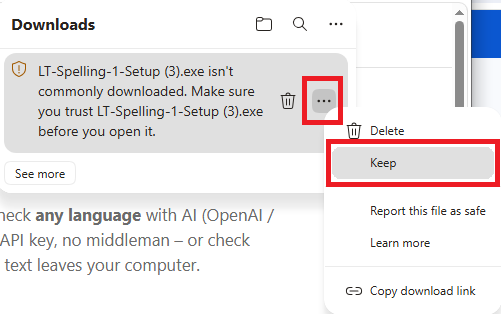
LT-Spelling-1-Setup.exe, apie 60 MB). Jame yra viskas, ko reikia, taip pat Microsoft VSTO runtime, jei jo dar nėra jūsų kompiuteryje.Microsoft Edge may refuse to finish the download ("isn't commonly downloaded"). Open the downloads list (Ctrl+J), click the … next to the file and choose Keep:
Microsoft Edge gali nebaigti atsisiuntimo („isn't commonly downloaded"). Atidarykite atsisiuntimų sąrašą (Ctrl+J), spauskite … prie failo ir pasirinkite Keep:
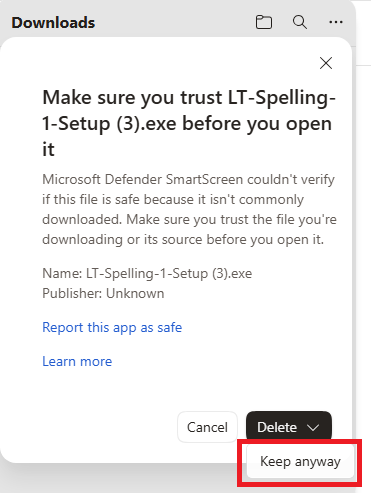
Edge then asks once more – click See more, then the arrow next to Delete and choose Keep anyway:
Edge paklaus dar kartą – spauskite See more, tada rodyklę šalia Delete ir pasirinkite Keep anyway:
Chrome: click Keep (or the ^ arrow → Keep). If you download the file more than once, the name gets a number, e.g.
LT-Spelling-1-Setup (3).exe– that is fine.Chrome: spauskite Keep (arba rodyklę ^ → Keep). Jei failą atsisiunčiate kelis kartus, pavadinime atsiranda numeris, pvz.
LT-Spelling-1-Setup (3).exe– tai normalu. -
Run it – Windows SmartScreen
Paleiskite – Windows SmartScreen
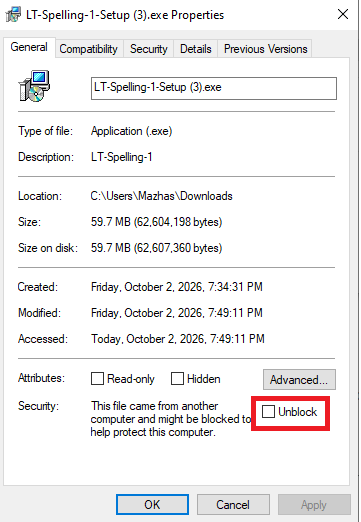
Shortcut: before running, you can right-click the downloaded file → Properties, tick Unblock and click OK. Windows then does not show the SmartScreen warning below at all:
Trumpesnis kelias: prieš paleisdami galite dešiniuoju pelės klavišu spustelėti failą → Properties, pažymėti Unblock ir spausti OK. Tada Windows žemiau aprašyto SmartScreen įspėjimo iš viso nerodo:
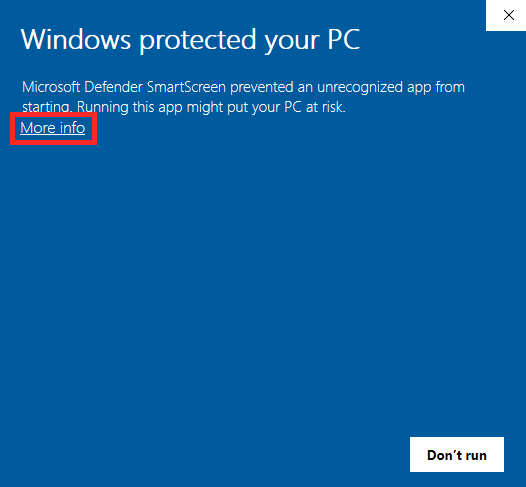
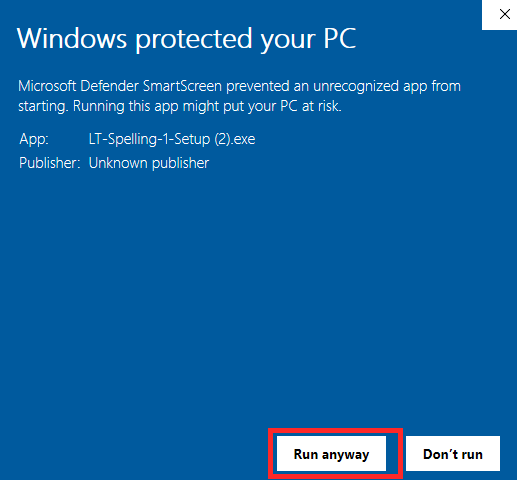
Otherwise: close Word, then double-click the downloaded file. A blue "Windows protected your PC" window appears. Click More info (red frame):
Kitu atveju: uždarykite Word ir du kartus spustelėkite atsisiųstą failą. Pasirodys mėlynas langas „Windows protected your PC". Spauskite More info (raudonas rėmelis):
Then click Run anyway:
Tada spauskite Run anyway:
-
Allow the installer (UAC) and follow the wizard
Leiskite diegimą (UAC) ir sekite vedlį
If your PC has no Microsoft VSTO runtime yet, Windows asks for permission to install it – click Yes. Then the LT-Spelling-1 wizard opens: I Agree → Install → Finish. The add-in itself is installed for your user only (no administrator rights needed for that part).
Jei kompiuteryje dar nėra Microsoft VSTO runtime, Windows paprašys leidimo jį įdiegti – spauskite Yes. Tada atsidarys LT-Spelling-1 vedlys: I Agree → Install → Finish. Pats priedas diegiamas tik jūsų vartotojui (šiai daliai administratoriaus teisių nereikia).
-
Open Word
Atidarykite Word
On the Home tab you should see the Spelling group with Check LT (Tikrinti LT in a Lithuanian Word). If you do, you are done.
Skirtuke Home turėtumėte matyti grupę Spelling su mygtuku Tikrinti LT (arba Check LT, jei Word angliškas). Jei matote – viskas paruošta.
-
If the add-in is not there – enable it in Word
Jei priedo nėra – įjunkite jį Word'e
Word sometimes leaves a new add-in switched off. Do this once:
Word kartais palieka naują priedą išjungtą. Padarykite tai vieną kartą:
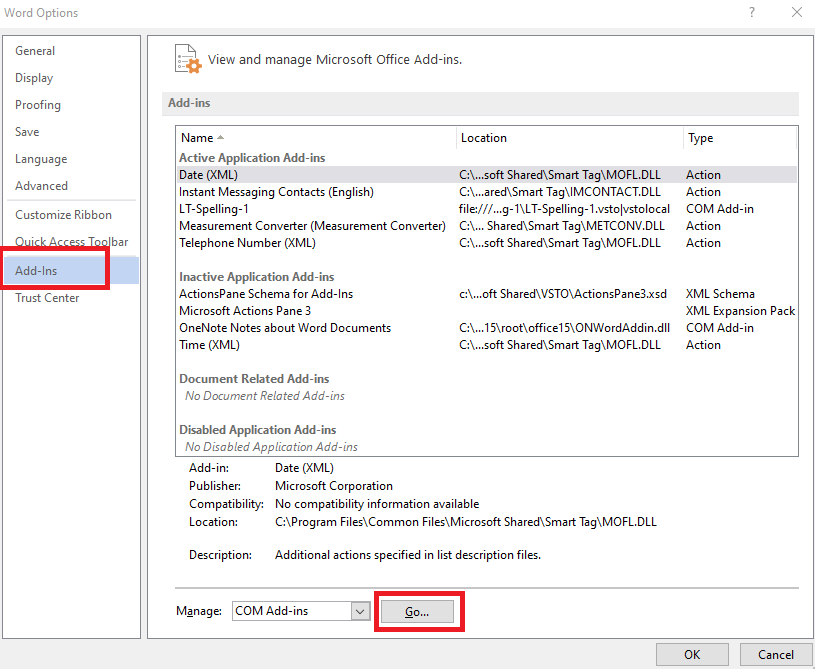
File → Options → Add-ins. At the bottom, in Manage choose COM Add-ins and click Go… (LT-Spelling-1 is listed under Active Application Add-ins when it is on, otherwise under Inactive or Disabled):
File → Options → Add-ins. Apačioje, prie Manage, pasirinkite COM Add-ins ir spauskite Go… (LT-Spelling-1 yra sąraše Active Application Add-ins, kai įjungtas, kitu atveju – Inactive arba Disabled):
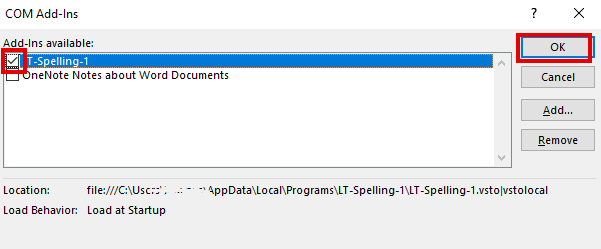
Tick LT-Spelling-1 and click OK (Load Behavior should say "Load at Startup"):
Pažymėkite LT-Spelling-1 ir spauskite OK (Load Behavior turi rodyti „Load at Startup“):
If it is not in that list, choose Disabled Items in Manage → Go…, select LT-Spelling-1 and click Enable, then restart Word.
Jei jo sąraše nėra, prie Manage pasirinkite Disabled Items → Go…, pažymėkite LT-Spelling-1, spauskite Enable ir perkraukite Word.
-
Try it, then add your licence key
Išbandykite, tada įveskite licencijos raktą
The full version works free for 14 days. To use it after that, buy a licence and paste the key via the Licence button in the Spelling group.
Pilna versija veikia nemokamai 14 dienų. Norėdami naudoti ilgiau, įsigykite licenciją ir įklijuokite raktą mygtuku Licencija grupėje Spelling.
Still stuck?
Vis dar nepavyksta?
Write to support@lk-tech.download – include a screenshot of the message you see.
Rašykite support@lk-tech.download – pridėkite matomo pranešimo ekrano nuotrauką.